
Last updated on December 21st, 2025 at 10:20 am
I understand, I see you are attempting to find out whether this Desktop Support Technician proposition is a live one. Perhaps you are just out of school, you have a dead end job, or maybe you have been wondering how to enter into the world of IT without investing four years with a degree.
The thing is this: I did my homework and made a living to find out what exactly a Desktop Support Technician does, and in this case? It is much more interesting than that.
So What is a Desktop Support Technician, Really?
They are the IT firefighters of any company. You should call Karen when her laptop fails to boot up, when the marketing department cannot get into their files, etc.
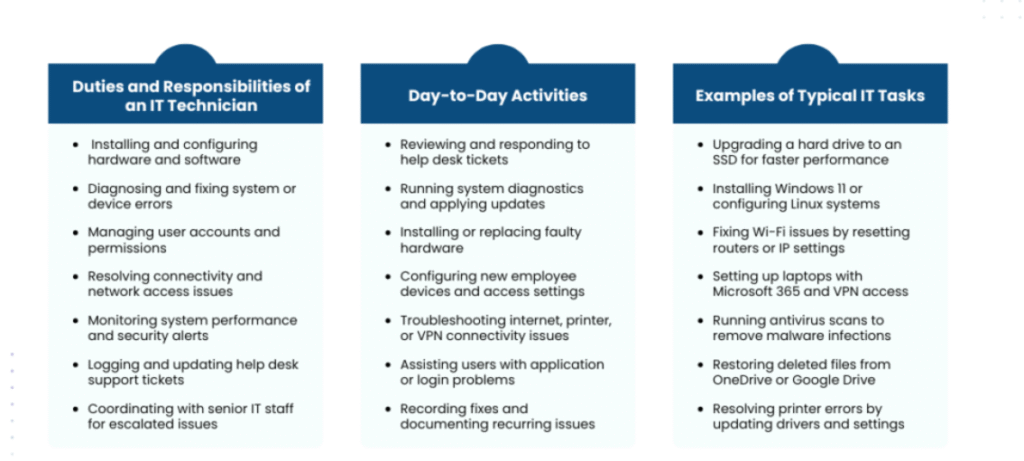
A Desktop Support Technician deals with the day in, day out tech devastation. They are troubleshooting computer systems, correcting software bugs, configuring new workstations with new employees, and ensuring that printers do not lose functionality at key points in the report.
They are even sitting next to you in the office. In other instances they are fixing your problems, miles away, as you are crossing the country.
The hardware (laptops, monitors, keyboards), software (Windows updates, Office 365, crashy random apps), networking (WiFi issues, VPNs), and numerous password resets are all covered by the job. Admittedly, people lose passwords every now and then.
What You’ll Actually Be Doing
This is what a normal job description will sound like once you remove the corporate jargon:
You are answering help desk tickets – scores of them. You are problem solving hardware failures, software crashes and network connectivity. You are installing and configuring desktop systems and creating new user accounts with the correct permissions, and ensuring that everybody has access to what they require.
There’s maintenance of the routine. Updates on systems, security checks, equipment monitoring. Besides, you will put all of it down though the next person (or you yourself, three months on) will not have to work it out on their own.
Oh, and you’re teaching people. Not technically, but you will take time to demonstrate to users how to prevent the same occurrences or give reasons why some security measures can help them.
Skills You Actually Need
The Desktop Support Technician should know what, let us sub-divide this.
Technical: Good understanding of windows, macOS and perhaps Linux based on the firm. Active Directory and Office 365 are mentioned every time. There is no alternative to the necessity to grasp the principles of networking (TCP/IP, DNS, DHCP) since WiFi troubleshooting is at least half the battle.
Problem-solving: This is huge. You will encounter bizarre problems that Google will not provide the solution. You have to think critically, experiment and improvise.
Communication skills: What you don’t know about this job… It’s 50 percent technical and 50 percent people skills. You are discussing technology to people who are non-technical. Patience, empathy, and the skill of remaining calm when a person is panicking since their presentation is taking an hour to open on time five minutes before a meeting are required.
Organsation: In case you have 20 tickets, three equipment setups and a real crisis problem on a printer by someone who needs to be taken care of on the highest priority list you will know how to organize things.
Certifications which are Real.
This does not require a four year degree. Seriously. But certifications? They help a ton.
CompTIA A+ is the big one. It is an introductory level, well-known, and is simply an indication that you are conversant with hardware and software fundamentals. It is requested or desired in a number of job openings.
Microsoft 365 Certified: Modern Desktop Administrator is reasonable when operating in the environment where it is based on the Microsoft tools (spoiler: the majority of them are).
Want to go further? Network+ and security+ CompTIA networks open further success. Cisco CCNA is good in the network direction. Google IT Support Professional Certificate is less expensive and quicker in the case when you are a beginner.
ITIL Foundation provides an introduction to the structure of IT service management, in other words, how professional IT departments operate.
You don’t need all of these. Start with A +, where the job takes you, and then add some more, depending on what you are going to do next.
The Money Talk
It is not really a 6 figure job at the start. In the US, it is between 41,000 and 60,000 a year with the place of residence and experience. It is the senior roles or special positions that are higher.
However, this is the reason why people accept these jobs: it is a launchpad. Many IT pros started their careers in the room. You get learned quickly, you observe the real-life implementation of technology in companies and you find out which segment of IT you desire to expand in.
Where This Role is Headed
The job’s changing fast. Simple tasks such as password reset and system updates are currently done by AI chatbots. Every vendor has a cloud system (Azure, AWS, Google Cloud) and you will have to be familiar with how to operate those. The fact that cybersecurity is becoming a larger issue as well – help desk personnel commonly occur the first ones to notice security threats.
Telecommuting altered the entire scenario. You are no longer trouble shooting the computer in the cubicle down the road. You are cooperating with people worldwide helping them with their home networks and personal gadgets. It is more flexible and sloppier.
Is This Career Worth It?
There is my opinion; Desktop Support is one of the best things you can do in case you are trying to enter the IT field, without a fancy degree, or a multitude of experience.
You will acquire actual skills quickly. When you learn, you will be paid. And with a smart move on it, getting certifications, developing cloud proficiencies, being inquisitive, you will not have to spend your entire life here. The Desktop Support into system administration, network specialist, cybersecurity, and even IT management are examples of people moving away.
The challenges? You will be selling a large number of tickets, users that are not so excited to see you and technology changes all the time that you have to keep learning. Some days you’re a hero. On other days you are repeating yourself ten times how it actually works when switching it off and then on again.
Bottom Line
What is a Desktop Support Technician? It is a person who keeps the technology operating to leave everyone to do his or her job. It is not glamour but it is a consistent job in the process that is not going anywhere.
If you’re okay with solving puzzles, helping people, and learning on the fly this might be your way in. Just don’t plan to stay forever. Use it as the stepping stone it’s meant to be, and you’ll be fine.
Read:
I Built a Real Estate Tracker Using Free APIs- Here’s What I Learned

I’m software engineer and tech writer with a passion for digital marketing. Combining technical expertise with marketing insights, I write engaging content on topics like Technology, AI, and digital strategies. With hands-on experience in coding and marketing.


