Last updated on December 21st, 2025 at 07:06 am
I’ll be honest, when I heard about the Fortnite UEFN Persona Device, for someone new to creative mode, it felt overly complicated. But then I looked into it, and the truth was it’s far more accessible than you’d imagine.
For those of you that are new to UEFN and want to develop AI controlled NPC’s that actually talk with your player, here’s the scoop.
What Is the Persona Device?
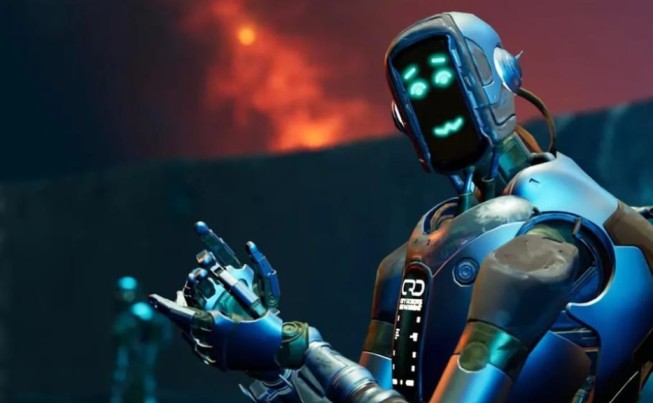
So, imagine this: You’re creating a Fortnite island and you’d like to add an NPC that has some character. Not just some robotic NPC standing there, but one that could actually talk to and engage with players. The Persona Device is designed to do that. At its core, it’s a service that allows you to generate AI-driven personalities with their own voice, conversation style and dialogue. It’s like bringing a living, breathing character into your game world.
Persona Device is currently in beta this means that its not yet perfect, but it’s good enough. Epic Games has been putting it through its paces, and developers are already making cool things with it. The best part? You don’t have to be a programming wizard to get started.
Before you begin: Get Beta Access
That’s the first roadblock not everyone can access the Persona Device yet. It’s in closed beta, though, so you’ll have to request access. Swing by the Unreal Engine developer forums and Discord channels to track down our Persona Device feedback threads. Let Your Interests Guide You – add yourself to any community! Epic Games always opens the floodgates to new creators, so your time will arrive yet.
Once you’re in down there, you will have all of the parts you need to experiment. I know, the waiting part is an annoyance, but it’ll be worth it.
Step 1: Include the Persona Device in Your UEFN Project
Alright, let’s actually build something. Here’s what you do:
To do this, first open UEFN and load your project. Then go to the Content Browser (the file explorer inside the editor). Navigate to Fortnite > Devices and you’ll see the “Persona Device” waiting there. Just drag it into your scene wherever you fancy hosting your NPC, wherever you want them to hang out. Seriously, that’s it. You set down your first Persona Device.
Pretty straightforward, right? The tougher task is not where to position it. but how to make it actually do anything.
Step 2: Choose Your NPC’s Personality
Here is where the magic comes in. Select your Persona Device and check the Details panel to the right. There should be choices to personalize your NPC’s characteristics. This is what will determine who your character really is.
You’re going to give it what’s known as a “persona prompt” in other words you’re instructing the AI how your character should act, what tone to take and what they know. (Here’s one of my responses: “You are a friendly tour guide named Max. You’re excited to take players on a tour of this island. funny but helpful.”
This doesn’t require any coding. You’re basically typing in instructions for the AI to follow. The more detailed you are, the better your NPC will be. So instead of saying “be funny,” you describe what funny is to that character. That’s what separates a typical NPC from one that you actually believe is alive.
Step 3: Select Voice and Dialogue Style
Here’s the other cool part you can actually customize how your NPC sounds. There are choices in voice type, pitch and manner of delivery. Think of it as casting a character voice for a movie. Prefer someone who is more energetic and fast-talking? Calm and mysterious? Laid-back and chill? Choose the one that corresponds to your character’s personality.
Currently, the voices that have been demonstrated by Epic Games with help from their AI Darth Vader are what you get, so you’re getting some fairly good options. There are more available options which will be added later, so this only gets better.
Step 4: Your Persona Becomes Part of the Game Narrative
And now you have this AI NPC just hanging out there, Voice skill elbows resting on the desktop, waiting to get used. Now you want to make it start interacting with players! That’s where the new UEFN device-event system comes in for Fortnite.
You can connect your Persona Device to triggers, events that occur in your game. For example:
- Strike up a conversation when the player comes near your NPC.
- Start a conversation when someone is doing a quest
- Turn on the NPC when a button is pushed
For this, you don’t need to write bogus code. We thought that UEFN’s event system is pretty visual and easy to use. Plug in a trigger, plug your Persona Device and bam now event hits and that NPC comes to life.
Step 5: Address the Quirks (Cloud Lag)
Real talk : real fast the Persona Device is currently dependent on Epic’s cloud AI services, so your NPC isn’t going to immediately respond. It’s not too bad, but it is noticeable at times.
So here’s the workaround: preload place-holding text until your actual response hits. Sort of like a loading screen best I can tell. Players see a quick “thinking…” and then the NPC response actually comes. It makes the experience feel less clunky, and also, let’s face it: It actually works for an AI character.
Getting Help and Resources
You’re not alone in this. Actual docs from Epic Games are available on their developer website just search “Persona Device”. There’s a lot of demo that shows everything in action, including an NPC named “Mr. Buttons”, in the keynote for State of Unreal 2025 as well. You should also look at Reddit’s r/FortniteCreative community, where plenty of creators are posting workarounds and tips.
The Bottom Line
The Fortnite UEFN Persona Device may sound intimidating, but when you start up it’s actually pretty straight forward. You’re basically dropping a gadget, giving it a personality and wiring it up to game events. The AI does the grunt work. You have to start small, create a basic NPC, test it and iterate. That’s how you learn. And before you know it, you’ll have lush islands populated by characters who actually feel like they’re supposed to be there.
The future of Fortnite Creative is artificially intelligent, and you have the tools to make it happen right now.
Also Read: Fortnite 2025: Evolution of the Metaverse Platform

Hi, I’m Veena and I’m passionate about sharing honest, in-depth reviews that help people make smarter choices. I’ve spent years exploring products, tech, and trends, and I enjoy breaking things down in a way that’s easy to understand. Whether it’s a gadget, app, or lifestyle tool, I aim to give you clear, practical insights based on real experience.